RocketFish RF-G1182 Manuel d'utilisateur

Naviguer en ligne ou télécharger Manuel d'utilisateur pour Séparateurs vidéo RocketFish RF-G1182. Rocketfish RF-G1182 User's Manual Manuel d'utilisatio

  • Télécharger
  • Ajouter à mon manuel
  • Imprimer
  • Page
    / 2
  • Table des matières
  • MARQUE LIVRES
  • Noté. / 5. Basé sur avis des utilisateurs
Vue de la page 0
Package contents
• HDMI splitter
AC power adapter
Quick Setup Guide
You will need:
High-speed HDMI cables
RF-G1182
QUICK SETUP GUIDE
Features
Sends HDMI A/V signals from a single source,
such as a Blu-ray/DVD player, set-top box, to
two destinations, such as a TV and A/V receiver.
Supports full 1080p video resolution
Supports 3D video
Compatible with most TV and PC monitor
video resolutions
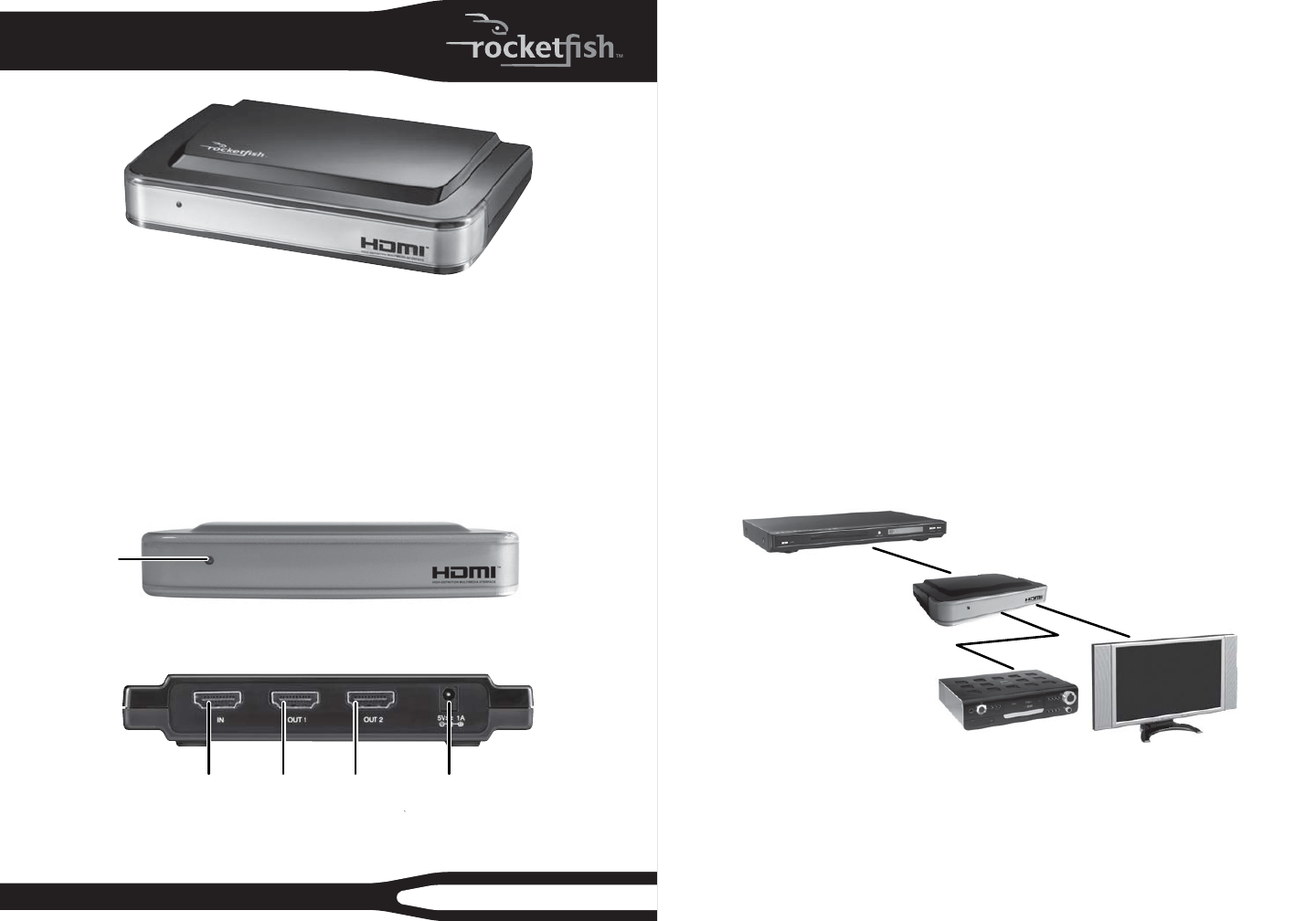
Two-way HDMI Splitter
Front
Back
Power LED
HDMI splitter basics
This Rocket sh two-way HDMI splitter will send the HDMI audio and video signals
from a single source, such as a Blu-ray/DVD player or cable/satellite box, to two
destinations, such as a TV and A/V receiver. It is ideal for sending the audio signals
from a 3D Blu-ray player to an A/V receiver that does not support 3D video pass-
thru.
Setting up your HDMI splitter
1 Connect one end of a high-speed HDMI cable (not included) to your video
source and the other end to the IN port on the HDMI splitter.
2 Connect another high-speed HDMI cable to your HDMI splitter’s OUT 1 port to
an HDTV.
3 Connect another high-speed HDMI cable to your HDMI splitter’s OUT 2 port to
an A/V receiver.
4 Connect the included AC adapter from the DC jack on the HDMI splitter to a
standard 110/120V AC outlet. Power on all connected devices and operate per
the manufacturers instructions.
Connecting a TV and A/V receiver to a single HDMI source
HDMI IN port DC power 5V/1A connectorHDMI
OUT 1 port
HDMI
OUT 2 port
HDMI video source
HDMI splitter
HDTV
A/V receiver
HDMI IN
HDMI OUT2
HDMI OUT1
Vue de la page 0
1 2

Résumé du contenu

Page 1 - Two-way HDMI Splitter

Package contents• HDMI splitter• AC power adapter• Quick Setup GuideYou will need:• High-speed HDMI cablesRF-G1182QUICK SETUP GUIDEFeatures• Send

Page 2

TroubleshootingSymptom Possible solutionLED is not ON or lit1 Make sure that the HDMI splitter’s power adapter is plugged in.2 Make sure that the vi

Commentaires sur ces manuels

Pas de commentaire